Hacking the Heat: Retrofitting Adax Heaters with ESPHome and Custom PCBs
Moving from cloud-dependent heating to fully local control on custom hardware, in several phases.
Winter in Sweden means heating is not optional. We have a set of Adax Neo heaters in the house. They are good-looking, slim panel heaters, and they even have "Wi-Fi." But like so many IoT devices today, that Wi-Fi meant relying on a proprietary app and a manufacturer's cloud.
I wanted local control in Home Assistant, faster response times, and no dependence on an external internet connection.
What began as a software hack grew into a custom hardware project. This post covers how I moved control of the heating fully in-house.
Phase 1: software control
The first thing I found was that the "smart" module inside the Adax heater was not a proprietary black box. It runs a standard ESP32.
An ESP32 can run ESPHome, so the path was clear.
I flashed a custom ESPHome firmware onto the existing Adax modules. After that, the heaters no longer talked to a remote server; they talked directly to my Home Assistant instance over the local network.
I spent some time fine-tuning the configuration, figuring out the correct current settings for the 800W and 1000W 400V variants, and optimizing the development workflow using the ESPHome CLI for rapid over-the-air updates.
At this point I had the original goal: local control. The heaters worked. I could have stopped here, but I decided to go further.
Phase 2: reasons for custom hardware
The software solution worked, but a few things pushed me to build custom hardware:
Hardware failure: One of my Adax heaters developed a broken control unit. Replacing the proprietary board is expensive enough that a DIY fix made financial sense.
Future proofing: The stock ESP32s are fine for Wi-Fi, but the smart home world is moving toward Thread and Matter, and I wanted hardware ready for that shift.
The "because I can" factor: There is a particular satisfaction in understanding and controlling every part of my own infrastructure.
I decided to replace the original Adax control board entirely with my own drop-in board.
Phase 3: Reverse Engineering and PCB Design
The goal was to create a board that fits into the existing slot on the heater and uses the exact same 6-pin connector.
Pinout mapping
Using a multimeter on an unplugged board, I mapped out the 6-pin header connecting the control unit to the heating element. We found the essentials: 3.3V power, Ground, a GPIO for the relay, and an Analog pin for the temperature sensor (NTC). There was also a simple resistor on Pin 4 that acts as a hardware ID, telling the heater to accept external commands.
Board design in Fusion 360
With the pinout mapped, I moved into Autodesk Fusion 360 to design the physical board.
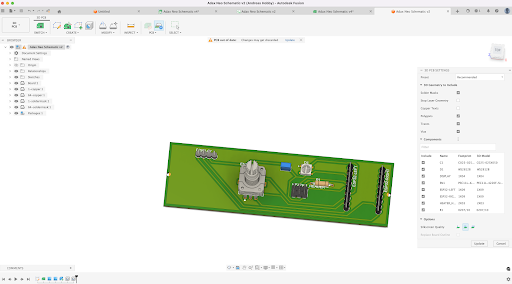
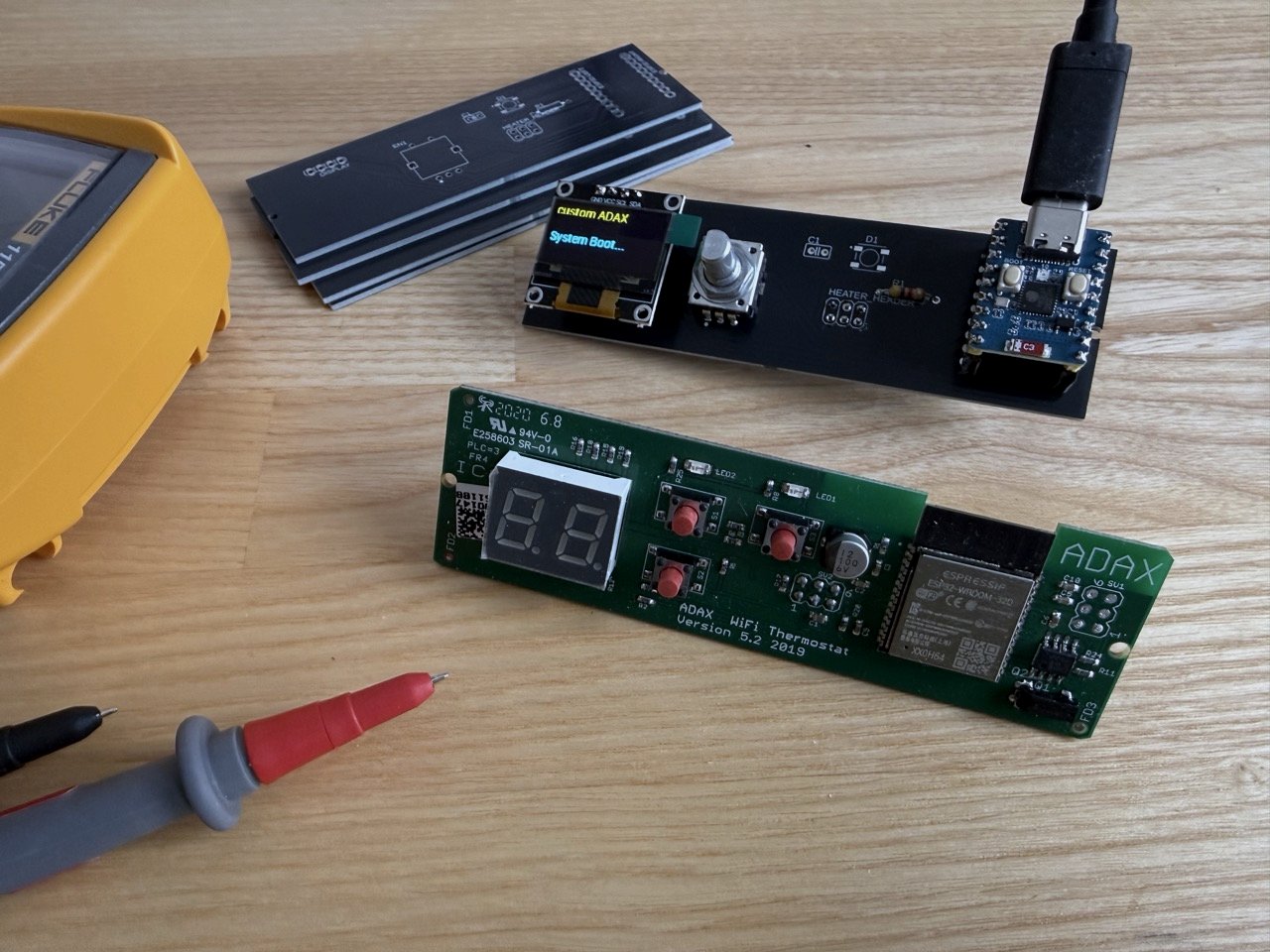
The controller: Instead of soldering an ESP32 chip directly, I designed the board with female headers that accept a Waveshare ESP32-C3 Zero. That choice matters: today I use Wi-Fi, but later I can unplug the module and drop in an ESP32-C6 to move the heater to Thread and Matter without redesigning the main board.
The interface: I added a standard EC11 rotary encoder for the dial and an I2C OLED screen to display temperature and status, matching the original functionality on better hardware.
The build: I stuck to through-hole components to keep the hand-soldering process easy and rugged.
The schematic was dense, but the logic was sound. I converted it to a PCB layout, defined the exact board shape (including the odd little notch on the left side), and added the ground planes.
Phase 4: assembly and next steps
I exported the Gerbers and sent them off to a PCB manufacturer in China.
Two weeks earlier those black PCBs existed only on my screen. Opening the box to find them as real, professional boards was satisfying. After a session with the soldering iron, the components were mounted.
I flashed my new ESPHome configuration, plugged the board into the heater, and the screen lit up. The prototype works. The relay clicks when it should, and the rotary encoder turns smoothly. Winter is on the way, and this time I control the thermostat from the hardware up to the server.
A bare PCB with an exposed OLED screen is not something I want mounted on the wall yet.
With the electronics and software finished, the last step is physical: designing and 3D printing a custom housing. The goal is a cover that mounts to the Adax chassis and gives the screen and encoder knob a finished look.
The 3D modeling process is next.